Cost-aware video analysis
Extract frames, analyze them with a vision model, and transcribe audio through Workers AI. The frame count is capped before any vision call runs, so --dry-run prints the call count before the run.



Probe, dry-run, then run
probe and extract need no API token. --dry-run counts frames without calling a model. Real output is in the Proof section below.
# inspect the video, estimate frames per mode (no token needed)
bun run src/cli.ts probe video.mp4

# count frames and name the model, without model calls
bun run src/cli.ts analyze video.mp4 --dry-run

# transcript-first run against Workers AI
CLOUDFLARE_ACCOUNT_ID=xxx CLOUDFLARE_API_TOKEN=xxx \
  bun run src/cli.ts smart video.mp4 \
  --max-timestamps 3 \
--prompt "Describe what's happening"What runs, in order
All logic lives in the library. The CLI is a thin wrapper. The architecture doc covers the module layout and each design decision.
1. Extract
ffmpeg pulls frames from the video. Three modes:
- scene — only on scene changes (default, fewest frames)
- interval — every N seconds
- keyframe — I-frames only
Frames are resized to a max dimension (default 512px) before analysis — smaller images mean fewer tokens.
2. Analyze
Each frame goes to a Workers AI vision model, 3 requests in parallel by default. --max-frames caps how many frames reach the model, so the vision-call count has a ceiling you set.
--dry-run prints that count and the model name without making a call.
3. Transcribe
Audio is extracted and split into 30s chunks. Each chunk is sent to Workers AI Whisper. Segments are reassembled with timestamps.
4. Smart
smartAnalyze transcribes first, then asks a text LLM which timestamps the transcript flags as visual (diagrams, slides, code). It extracts a frame at each flagged moment and analyzes only those.
Vision calls track the number of visual references, not the length of the video.
One run on an 11-second clip
The input is below: three slides rendered from HTML in headless Chrome, stitched with a say voiceover. It ran against Workers AI with whisper, llama-3.1-8b-instruct for timestamp selection, and llama-3.2-11b-vision-instruct for the frame. A demo input, not a benchmark.
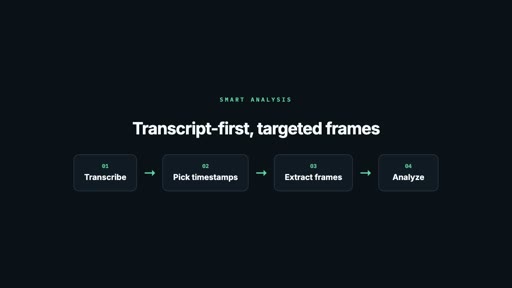
frame at 10s, resized to 512px — exactly what the model received
The transcript flagged one moment strongly ("now let's look at the smart analysis flow"), so the selector returned a single timestamp and the run made one vision call instead of analyzing all three slides. The description is accurate down to the box labels and arrow color, which is the point: the frame is read only where the transcript says something visual happens. Blind extraction grows vision calls with video length; smart grows them with the count of visual references.
Count the calls before running
Vision calls are the line item to watch, so the estimator counts them per mode. Whisper and the single text LLM call are listed separately. The cost model has the frame-count tables and worked scenarios.
All logic in userland
The CLI is a thin wrapper. Import and call directly.
import { smartAnalyze } from '@acoyfellow/vidframes';

const result = await smartAnalyze('video.mp4', {
  maxTimestamps: 5,
  analyze: { prompt: 'Describe the diagram shown' },
  onProgress: (phase, detail) => console.log(`${phase}: ${detail}`),
});

// 1. transcribes audio in 30s chunks
// 2. asks text LLM which timestamps have visual value
// 3. extracts 3-5 frames at those exact timestamps
// 4. analyzes only those frames with vision model
console.log(result.selectedTimestamps);
// [{timestamp: 120, reason: "whiteboard diagram"}, ...]| Function | Description |
|---|---|
probeVideo(path) | Get duration, resolution, fps, codec |
extractFrames(path, opts) | Extract frames (scene/interval/keyframe, resize, limit) |
extractFramesAtTimestamps(path, ts, opts) | Extract single frames at specific timestamps |
analyzeFrame(path, opts) | Send one frame to a vision model |
analyzeFrames(frames, opts) | Batch analyze with concurrency + maxFrames |
analyzeVideo(path, opts) | Extract + analyze + transcribe in one call |
smartAnalyze(path, opts) | Transcript-first: transcribe → LLM picks timestamps → extract 3-5 frames → analyze |
selectTimestamps(transcription, info, opts) | Ask text LLM which timestamps have visual value |
transcribeVideo(path, opts) | Extract audio, chunk, transcribe via Whisper |
estimateAnalysis(info, extractOpts, analyzeOpts) | Dry-run cost estimate |
One click to your own account
The button clones the repo into your GitHub, builds the site with bun run build, and deploys the Worker to your account on *.workers.dev. No bindings or tokens to configure.
Or deploy from a clone:
bun install
bun run deploy           # your account, *.workers.dev
The deployed Worker only serves this docs site — it builds site/dist and exposes /health, with no Workers AI binding or token. Frame extraction, analysis, and transcription run locally through the CLI, where your token stays on your machine.